next up previous contents
Next: 2.3.10 Operation Element: SetSize Up: 2.3 The FileStructure Section Previous: 2.3.8 Operation Element: AddValue   Contents


2.3.9 Operation Element: SetDims

The SetDims element indicates that an array's dimensions should be set. This is used when the dimensions of an array may change, depending on the values of other parameters in the file. SetDims sets the array's dimensions all at once; this is different from SetSize (see Section 2.3.10), which sets the dimensions one at a time. The SetDims element has the following attributes:
Attribute Name Description Required
target The name of the array for which to set the dimensions yes
dims A comma-delimited list of the maximum index for each dimension. Note that an item in the list can be an integer or a parameter name provided that the value of that parameter has been set, in which case the value of that parameter will be used yes

The SetDims element contains no other elements.
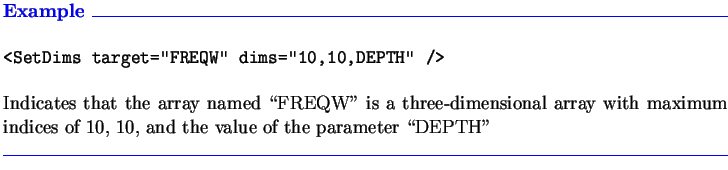
$\textstyle \parbox{6.3in}{\textcolor{blue}
{\textbf{Example \hrulefill}}\\
\pa...
... 10, and the value of the parameter \lq\lq DEPTH''
\\ \textcolor{blue}{\hrulefill}}$


next up previous contents
Next: 2.3.10 Operation Element: SetSize Up: 2.3 The FileStructure Section Previous: 2.3.8 Operation Element: AddValue   Contents

SAIC Ship Technology Division, Annapolis, Maryland, USA
2004-10-26