


The Loop element indicates that the contained structure and/or operations should be repeated a certain number of times. Loop elements can be nested in order to populate a multi-dimensional array. Loops can be set up in four different ways, which can be combined as needed:
The Loop element has the following attributes:
| Attribute Name | Description | Required |
|---|---|---|
| loopVariable | Name of a local variable that stores the value of the loop index (iteration) | no |
| start | The starting value for the loop index. This can be an integer or the name of a parameter whose value had been set previously | yes |
| end | The ending value for the loop index. This can be an integer or the name of a parameter whose value had been set previously | yes |
| incr | The increment value for the loop index. This can be an integer or the name of a parameter whose value had been set previously | yes |
| check | Value to be checked as part of the stop condition | no |
| operator | The relational operator to be used. Must be GT (greater than), LT (less than), or EQ (equal to) | no |
| checkValue | The value to check against. This can be the name of a parameter whose value has been set previously | no |
| stopOnEof | True/False. If an end-of-file is encountered, a value of ``True'' will throw an exception but the method returns normally; set to ``True'' if an EOF is expected | no |
| doOnce | True/False. ``True'' means that, even if the checkValue fails, execute the loop once | no |
The Loop element must contain one or more structure elements such as Condition or another Loop, or one or more operation elements such as Separator, SetValue, SetSize, SetDims, or AddValue in any order.
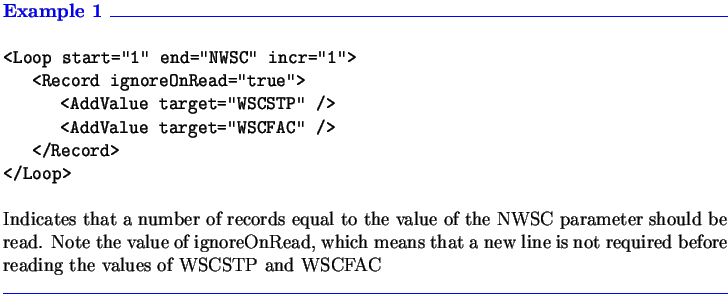
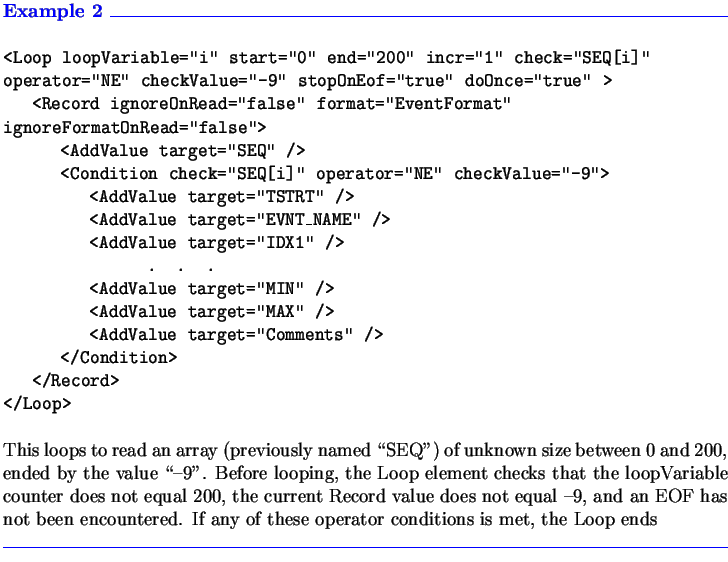
Another example, with a portion of an input file, is given in Section 3.3.